If you’ve landed here because you googled PSL Drop: WS or
fwmultik_process_f2p_cookie_inner at some ungodly hour — welcome.
You’re in the right place.
This case was escalated to me after a junior admin hit a wall. Here’s what we found, how we found it, and why the answer turned out to be bigger than anyone expected.
Symptom: Backup agents failing to register with the backup server
when traversing a Check Point firewall
Environment: Check Point R81.20 with Jumbo HFA 99 or later
Observed: Firewall log shows connection accepted, yet agents fail
to register
From the team: “Our backups are failing, agents aren’t registering to the server”
📅 Update — April 2026: CommVault has an updated MediaAgent version that includes the
Host:header, bringing it into compliance with RFC 7230 and RFC 9110/9112. If you are running the updated version, this specific issue will be resolved. If you are still seeingPSL Drop: WSon an updated agent, continue reading — the diagnostic methodology still applies. If you are on an older agent version: upgrade, and remove any IPS exceptions.The historical context and RFC analysis below remain valid regardless of agent version.
What the Junior Admin Found
The junior admin did some independent digging and got a suggestion to run a zdebug —
which isn’t a bad idea. [⚠️]. The zdebug returned:
[Expert@fw2:0]# fw ctl zdebug -m fw drop | grep -E ':8403'
@;882640557.8263;[vs_0];[tid_1];[fw4_1];fw_log_drop_ex: Packet proto=6 192.0.2.136.5:58898 -> 203.0.113.120:8403 dropped by fwmultik_process_f2p_cookie_inner Reason: PSL Drop: WS

@;882640701.8313;[vs_0];[tid_0];[fw4_0];fw_log_drop_ex: Packet proto=6 192.0.2.160.116:60107 -> 203.0.113.120:8403 dropped by fwmultik_process_f2p_cookie_inner Reason: PSL Drop: WS
zdebug is good for exactly what JuniorAdmin did here. This quickly
pinpointed a very specific problem in very specific module with a very
specific message. JuniorAdmin didn’t just report “backups are broken” —
they dug in independently, found a tool, and used it correctly.
Even better, JuniorAdmin knew their own limits, knew when it was time to escalate rather than “let me try this other command thing that I don’t understand”. JuniorAdmin collected “ground truth” data that’s perfect to include in any escalation.
This actionable and productive info matters enormously when you’re wading through SK articles and trying to narrow down which one applies. This is exactly what you want from your Juniors! Well done!
⚠️ An obligatory and Pavlovian word about
zdebug
zdebugis a macro. It sets a 1MB RAM buffer, disables all debug modules and flags except the one being used, then clears the flags after it ends. You can’t add to an already-runningzdebug, and you can’t debug more than one module at a time.zdebugshould be ran only for short periods of time; a few seconds, but not much more than a minute.
zdebugCAN crash a gateway. It has happened. Don’t go running it thinking you’re doing a full debug — you’re doing a quick sniff test of a partial debug.With that said:
zdebugis fine, in moderation. It’s good for exactly what JuniorAdmin did here — a fast, targeted sanity check. Just know what it is and what it isn’t.
Deciphering the Debug Message
The debug message itself gives us some clues as to where the issue is
happening. Let’s look at each word in the string by splitting mostly along
the underscores. Here’s the zdebug output again for reference:
[Expert@fw2:0]# fw ctl zdebug -m fw drop | grep -E ':8403'
@;882640557.8263;[vs_0];[tid_1];[fw4_1];fw_log_drop_ex: Packet proto=6 192.0.2.136.5:58898 -> 203.0.113.120:8403 dropped by fwmultik_process_f2p_cookie_inner Reason: PSL Drop: WS

@;882640701.8313;[vs_0];[tid_0];[fw4_0];fw_log_drop_ex: Packet proto=6 192.0.2.160.116:60107 -> 203.0.113.120:8403 dropped by fwmultik_process_f2p_cookie_inner Reason: PSL Drop: WS
fwmultik_process— This is happening in the multi-kernel firewall worker. This means the connection is happening in Medium Path on a CoreXL worker thread. We can see whichfwworker it is, as noted by “fw4”. The 1 and 0 are different threads handling different packets.f2p— Forward to PSL (Passive Streaming Layer/Library). This means the issue is happening within IPS, not AppControl or URL Filtering. No amount of custom URL applications can address this issue.cookie_inner— This is a clue that the issue involves the HTTP protocol. This comes from the protocol handler within the fw worker’s context manager. See sk95193.WS— Web Security. This was once a separate licensed product in the R60-ish days, later merged into IPS around R65. Web Security brought over much of the CMI protocol handlers and PSL library into today’s IPS.
TL;DR: This error is a protocol parser error for an HTTP session of some kind, and not TLS. Likewise, it’s neither App Control nor URL filtering.
Sources:
How to Troubleshoot
The overall approach follows a few seemingly simple steps:
- Search for and read any relevant SK articles for the issue
- Read through any Jumbo HFA release notes for relevant patch notes
- If reproducible, and if any interesting SK articles refer to specific packet patterns, capture any relevant packets to have a solid comparison (and RCA analysis evidence)
Starting with SecureKnowledge
If you have access, search SecureKnowledge for any similar issues. Depending on your access level you may or may not be able to see details of certain results. In this case, the best search string is a subset of the error message itself:
fwmultik_process_f2p_cookie_inner Reason: PSL Drop: WS
The search turns up several results, but these seem the most promising:
- sk183902 — Relevant if App Control/URL Filtering are enabled and in use in the policy
- sk184133 — Relevant if Jumbo HFA is 99 or higher
- sk183569 — Relevant if any recent Jumbo HFA was installed (but a specific JHF release is not identified)
The first SK article (sk183902) describes the HTTP CONNECT method with
a malformed request involving VMware services. That’s interesting, and
certainly worth reviewing. The solution is to use the fast_accel feature
to deal with VMware’s malformed request. That’s not this issue. Using
fast_accel is a “cheat code” that papers over a real problem, and comes with
its own limitations and side-effects. Only use as a very last resort.
Bookmark this article in a “potential solutions” list, but keep digging.
The second SK article (sk184133) calls out a specific Jumbo HFA and a high correlation to connections on port 8080. However, the zdebug (or a proper kdebug) didn’t reveal the same “ws_http_session_send_header” debug message as is in the article. The article calls out a specific HTTP POST request, so this is different than the first article already. It also calls out an issue with the “Content-Length” header. This is already more interesting.
Before we go any further, we need to look into a packet capture because the second article gives us some clues. Go back to the firewall and collect a detailed packet capture with payload dump.
The Packet Capture
Finding the Right Interface
Before running the capture, you need to know which interface to specify with -i.
On a multi-interface firewall — especially in Azure where traffic hairpins —
picking the wrong interface means you capture nothing useful.
Use the routing table to find which interface handles traffic to the client IP:
ip route get <client_ip_address>
The issue is with the clients registering with the server, so we need to focus our capture on the client-facing interface (if relevant) to see what they’re doing.
The output will show the interface name (eth0, eth1, etc.) in the dev field.
Use that interface name with -i in your tcpdump command.
Example:
[Expert@fw2:0]# ip route get 192.0.2.4
192.0.2.4 via 198.51.100.1 dev eth1 src 198.51.100.2
In this case, -i eth1 is your answer.
Capturing the Traffic
Collect a detailed capture with full payload on port 8403.
I include the entire packet trace here because this is what you, too, will see and you need to know how to wade through it. This capture output is for traffic on port 8403 to and from any host in any direction. You won’t always have the convenience of Wireshark on hand, especially if the host is far remote from you, so being able to read the tcpdump output on the console is your best tool. It’s ugly at times, but it’s the only environment you have.
The CommVault protocol and connection sequence we expect to see: CommVault MediaAgent on the the clients initiate connection to the backup server on the server’s port 8403 for agent registration.
[Expert@fw2:0]# tcpdump -nni eth1 -xXvvl -s 0 port 8403
tcpdump Parameter Reference
| Flag | Meaning |
|---|---|
-n |
Do not resolve host IPs to names with reverse DNS |
-n (second) |
Do not translate port numbers to service names with reverse service lookups (/etc/services) |
-i eth1 |
Monitor a specific interface |
-x |
Print packet data in hex |
-X |
Decode packet data as ASCII |
-vv |
Verbose: decode additional fields |
-l |
Line-buffer output |
-s 0 |
Capture the entire packet (0 = no truncation) |
port 8403 |
PCAP filter: port 8403, source or destination |
Note on duplicate packets: This firewall is in Azure and acts as a forwarding hub for all peered VNETs. All packets hairpin through this interface due to the Azure VNET peering flow forwarder, pass through SecureXL (or the firewall policy) and back out to the internal load-balancer. You will see what appear to be duplicate packets. Instead, you’re seeing packets ingres the interface and egress the same interface — this is expected in this topology.
Note on IPs: All addresses have been changed to IANA TEST-NET addresses per RFC 5737.
192.0.2.0/24= backup agent hosts,203.0.113.0/24= backup servers. Hex values and checksums have been sanitized accordingly.
Packet capture ouput
02:15:23.548354 IP (tos 0x0, ttl 128, id 6873, offset 0, flags [DF], proto TCP (6), length 48)
    192.0.2.116.60126 > 203.0.113.130.8403: Flags [S], cksum 0xaaaa (correct), seq 857059150, win 8192, options [mss 1418,nop,nop,sackOK], length 0
	0x0000:  4500 0030 1ad9 4000 8006 f892 c000 0274  E..0..@......d.t
	0x0010:  cb00 7182 eade 20d3 3315 af4e 0000 0000  ..2.....3..N....
	0x0020:  7002 2000 8dd7 0000 0204 058a 0101 0402  p...............
02:15:23.548388 IP (tos 0x0, ttl 127, id 6873, offset 0, flags [DF], proto TCP (6), length 48)
    192.0.2.116.60126 > 203.0.113.130.8403: Flags [S], cksum 0xaaaa (correct), seq 857059150, win 8192, options [mss 1418,nop,nop,sackOK], length 0
	0x0000:  4500 0030 1ad9 4000 7f06 f992 c000 0274  E..0..@......d.t
	0x0010:  cb00 7182 eade 20d3 3315 af4e 0000 0000  ..2.....3..N....
	0x0020:  7002 2000 8dd7 0000 0204 058a 0101 0402  p...............
02:15:25.160230 IP (tos 0x2,ECT(0), ttl 124, id 14843, offset 0, flags [DF], proto TCP (6), length 69)
    203.0.113.120.8403 > 192.0.2.117.59209: Flags [P.], cksum 0xaaaa (correct), seq 2614851307:2614851336, ack 3028790516, win 8194, length 29
	0x0000:  4502 0045 39fb 4000 7c06 bd63 cb00 7178  E..E9.@.|..c..2x
	0x0010:  c000 0275 20d3 e749 9bdb 76eb b487 acf4  .d.u...I..v.....
	0x0020:  5018 2002 3138 0000 3030 3030 3133 0d0a  P...18..000013..
	0x0030:  ae00 0000 1381 8106 f988 0377 a8c8 e572  ...........w...r
	0x0040:  a653 be0d 0a                             .S...
02:15:25.205473 IP (tos 0x0, ttl 128, id 33685, offset 0, flags [DF], proto TCP (6), length 40)
    192.0.2.117.59209 > 203.0.113.120.8403: Flags [.], cksum 0xaaaa (correct), seq 1, ack 29, win 251, length 0
	0x0000:  4500 0028 8395 4000 8006 6fe8 c000 0275  E..(..@...o..d.u
	0x0010:  cb00 7178 e749 20d3 b487 acf4 9bdb 7708  ..2x.I........w.
	0x0020:  5010 00fb 2b0a 0000 0000 0000 0000       P...+.........
02:15:25.573593 IP (tos 0x2,ECT(0), ttl 128, id 19719, offset 0, flags [DF], proto TCP (6), length 52)
    192.0.2.4.58138 > 203.0.113.120.8403: Flags [SEW], cksum 0xaaaa (correct), seq 3210484172, win 8192, options [mss 1418,nop,wscale 8,nop,nop,sackOK], length 0
	0x0000:  4502 0034 4d07 4000 8006 ded9 c000 0204  E..4M.@......d..
	0x0010:  cb00 7178 e31a 20d3 bf5c 19cc 0000 0000  ..2x.....\......
	0x0020:  80c2 2000 a282 0000 0204 058a 0103 0308  ................
	0x0030:  0101 0402                                ....
02:15:25.610847 IP (tos 0x2,ECT(0), ttl 124, id 58170, offset 0, flags [DF], proto TCP (6), length 52)
    203.0.113.120.8403 > 192.0.2.4.58138: Flags [S.E], cksum 0xaaaa (correct), seq 853954865, ack 3210484173, win 65535, options [mss 1418,nop,wscale 8,nop,nop,sackOK], length 0
	0x0000:  4502 0034 e33a 4000 7c06 4ca6 cb00 7178  E..4.:@.|.L...2x
	0x0010:  c000 0204 20d3 e31a 32e6 5131 bf5c 19cd  .d......2.Q1.\..
	0x0020:  8052 ffff 3eda 0000 0204 058a 0103 0308  .R..>...........
	0x0030:  0101 0402                                ....
02:15:25.611481 IP (tos 0x0, ttl 128, id 19720, offset 0, flags [DF], proto TCP (6), length 40)
    192.0.2.4.58138 > 203.0.113.120.8403: Flags [.], cksum 0xaaaa (correct), seq 1, ack 1, win 1026, length 0
	0x0000:  4500 0028 4d08 4000 8006 dee6 c000 0204  E..(M.@......d..
	0x0010:  cb00 7178 e31a 20d3 bf5c 19cd 32e6 5132  ..2x.....\..2.Q2
	0x0020:  5010 0402 7bc1 0000 0000 0000 0000       P...{.........
02:15:25.611587 IP (tos 0x2,ECT(0), ttl 128, id 19721, offset 0, flags [DF], proto TCP (6), length 146)
    192.0.2.4.58138 > 203.0.113.120.8403: Flags [P.], cksum 0xaaaa (correct), seq 1:107, ack 1, win 1026, length 106
	0x0000:  4502 0092 4d09 4000 8006 de79 c000 0204  E...M.@....y.d..
	0x0010:  cb00 7178 e31a 20d3 bf5c 19cd 32e6 5132  ..2x.....\..2.Q2
	0x0020:  5018 0402 3983 0000 504f 5354 2068 7474  P...9...POST.htt
	0x0030:  703a 2f2f 3130 2e31 2e35 302e 3132 303a  p://203.0.113.120:
	0x0040:  3834 3033 2f54 756e 6e65 6c2f 5468 726f  8403/Tunnel/Thro
	0x0050:  7567 682f 4669 7265 7761 6c6c 2048 5454  ugh/Firewall.HTT
	0x0060:  502f 312e 310d 0a54 7261 6e73 6665 722d  P/1.1..Transfer-
	0x0070:  456e 636f 6469 6e67 3a20 6368 756e 6b65  Encoding:.chunke
	0x0060:  640d 0a56 6572 7369 6f6e 3a20 3237 0d0a  d..Version:.27..
	0x0090:  0d0a                                     ..
02:15:25.611701 IP (tos 0x0, ttl 127, id 30214, offset 0, flags [none], proto TCP (6), length 40)
    192.0.2.4.58138 > 203.0.113.120.8403: Flags [R], cksum 0xaaaa (correct), seq 3210484173, win 24862, length 0
	0x0000:  4500 0028 7606 0000 7f06 f6e8 c000 0204  E..(v........d..
	0x0010:  cb00 7178 e31a 20d3 bf5c 19cd 0000 0000  ..2x.....\......
	0x0020:  5004 611e a2c9 0000                      P.a.....
02:15:25.611707 IP (tos 0x0, ttl 127, id 58675, offset 0, flags [none], proto TCP (6), length 40)
    203.0.113.120.8403 > 192.0.2.4.58138: Flags [R], cksum 0xaaaa (correct), seq 853954866, win 24862, length 0
	0x0000:  4500 0028 e533 0000 7f06 87bb cb00 7178  E..(.3........2x
	0x0010:  c000 0204 20d3 e31a 32e6 5132 0000 0000  .d......2.Q2....
	0x0020:  5004 611e f7da 0000                      P.a.....
Analysis
Reading through the trace, we can see:
- Host 192.0.2.116 is trying to connect, but looking down the list, there’s no reply back from the backup server. Interesting. We’ll flag that for later, but keep moving.
- Host 192.0.2.117 has some existing session that’s trying to pass some data, but so far, not our issue.
- Host 192.0.2.4 is where it gets most interesting. We now see the entire
trace of the issue. This isn’t the same IP from the zdebug above, but
it’s still another host with the same issue. We found our reproduced
case. Now we look closer and start comparing the results against the
second SK article. If you wanted to wait for one of the
zdebug-listed hosts, that’s perfectly reasonable, and feel free to do so. I just happen to already know that this host is one of the many for this issue.
Near bottom is a plain text dump of the CommVault backup agent’s connection payload.
HTTP POST to the backup server on port 8403. We already knew it was 8403 from the
zdebug and firewall log. Here is the reasembled decode of the packet:
POST http://203.0.113.120:8403/Tunnel/Through/Firewall HTTP/1.1
Transfer-Encoding: chunked
Version: 27
Remember we’re still reviewing and comparing with the second SK article
(sk184133) with our packet capture. This article is describing a packet
with a Content-Length header having incorrect values and refers to XML
data payloads. We don’t see a Content-Length header in this HTTP packet,
nor do we see any XML tags in the payload. So maybe sk184133 is not our
issue. It’s close, but not quite. Regardless, sk184133 has some curious
references that you should open and keep bookmarked. We’re not done with
this one yet.
sk184133 says “Starting in Jumbo HFA 99, the gateway enforces strict compliance with RFC-7230”. Before we jump down that rabbit hole, we need to finish reviewing the third article. (Don’t worry, we are going to follow that rabbit in a few moments, below).
While we’re here looking at the packet again, there are some curious points that need to be addressed:
-
This isn’t a typical POST request, which includes the URI string of the URL (everything after the
http://<ip-or-host>/). This request form is legit, however. This is called an “absolute form” and is most often used when communicating via HTTP proxies. -
The POST method is also using the IP of the backup server. I did not sanitize out the customer’s FQDN or hostname; this was already an IP and I just replaced their IP with the TEST-NET IP.
-
The POST request contains the port number that’s already being used in the TCP session.
-
The URI string is… cute. Clearly someone is trying to be clever, deliberate, and very obvious what they’re trying to do: tunnel this connection through a stateful inspection firewall. More on this below.
-
The next header is Transfer-Encode: chunked. This right here means there will be no Content-Length header in this packet. This rules out article sk184133 instantly.
-
But… there’s something missing, and the answer is coming up next.
sk183569: Gold! 🏆
“Security gateway drops HTTP connections without the Host: header after installing a Jumbo HFA”
The article’s “Symptoms” tells us what’s happening, and why. I can reprint this here because this section is public:
As of either of these Jumbo HFAs:
- R81.10 JHF 177
- R81.20 JHF 99
- R82 JHF 25
…a kdebug or zdebug will show “drop by … Reason: PSL Drop: WS” or “PSL Reject: WS”
for HTTP connections missing the Host: header.
Next, check the gateway HFA version if you don’t know it already:
[Expert@fw2:0]# cpinfo -y FW1
This gateway is running R81.20 Jumbo HFA 118 — which includes JHF 99 for sure!
What else does the article say about JHF 99 and Host headers:
Starting from these Jumbo Hotfix Accumulator Takes (PRHF-37149), the Security Gateway enforces RFC 2616 and drops HTTP requests that do not include the mandatory “Host” header. Previously, this enforcement was more lenient, but it is now strictly validated by the Packet Streaming Library (PSL) component.
Here’s that decoded packet again:
POST http://203.0.113.120:8403/Tunnel/Through/Firewall HTTP/1.1
Transfer-Encoding: chunked
Version: 27
Headers include:
POSTmethod ✓Transfer-Encoding✓Version(application-specific, not HTTP) ✓
Content-Length doesn’t apply here, so that’s ok to be missing. Howevever, there’s no
Host: header!
sk183569 says it in plain language: The Host header is mandatory in RFC 2616, and is now being strictly enforced as of JHF 99. The strictness is being enforced by the Packet Streaming Library (PSL).
At this point you have enough evidence to take back to your team: CommVault is willfully violating RFC-2616 because they aren’t including the Host header.
But that’s not the end of the story:
- “Questions” will be asked (of you)
- The issue will be pressed (by your managers/team lead/IT director)
- Something must be done
“Can we just bypass the firewall?”, they’ll ask. No, CommVault is already trying to do that with their malformed HTTP request and cute “Tunnel” URI. The firewall is much more clever than CommVault’s developers.
- sk184133 says that R81.20 JHF 99 enforces stricter compliance with RFC-7230
- sk183569 says that R81.20 JHF 99 handles violations within PSL
So we still have work to do.
Check Point’s Response: JHF 99, 115, and 119
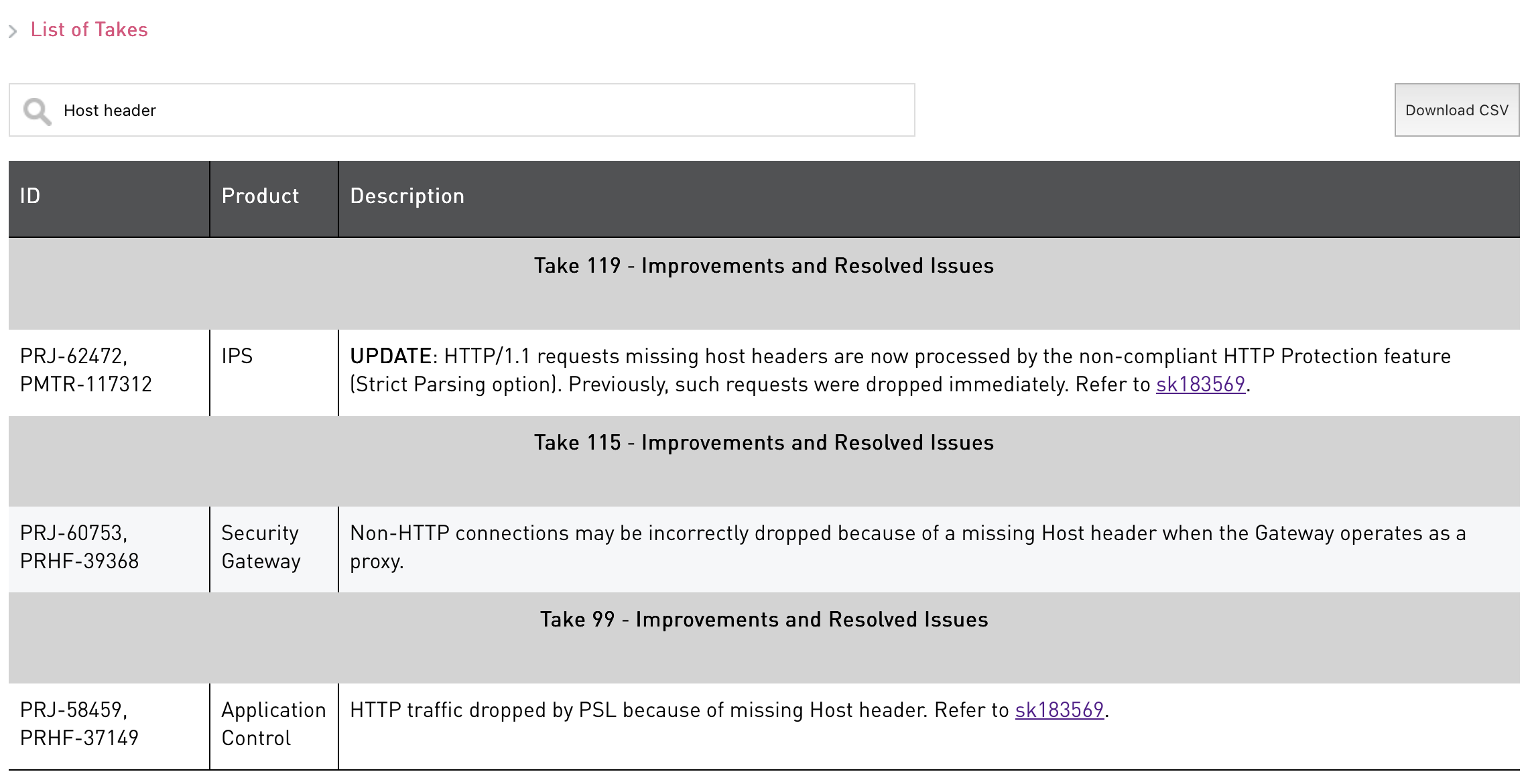
With JHF 99, Check Point tried to put the hammer down on non-compliant HTTP requests, which is the right thing to do for a security gateway. This seems to have had an unfortunate side effect of impacting their own gateway-as-HTTP-proxy service, so they included a hotfix in JHF 115 for that. Now, JHF 119 is available to handle this issue for a third time. They seem to have been flooded with complaints for “certain non-compliant applications” (ahem, CommVault).
Check Point’s fix in JHF 119 is rather clever. This is discussed in sk183569 as well. They are changing this PSL enforcement from being a silent drop in the kernel and instead moving it to the HTTP Protection Strict Parsing option in the IPS policy. This doesn’t fix the issue necessarily; the gateway will still enforce RFC strictness by default, but now you can configure an IPS exception for for offending traffic.
Do note, however, that if you make an exception for this, you are also willfully allowing a known malformed HTTP application to traverse the firewall. CommVault needs to fix their application. While you’re making an exception, you should open a case with CommVault and tell them what they’re doing wrong. Tell your managers, CISO, whomever, that this application requires the firewall to bypass its own protocol enforcement, opening a liability for arguably the most-sensitive application on your network.
Backups are gold, they hold the keys to your kingdom, they always run at highest privilege on the machine… and CommVault says to “look the other way”.
In fact, their own support article says so:
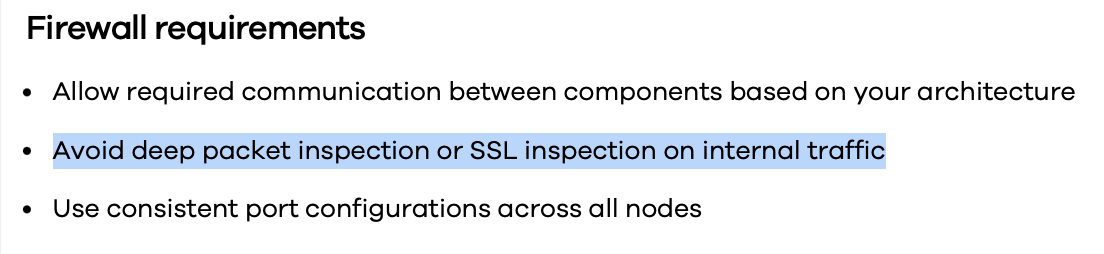
Source: CommVault documentation
- Allow required communication between components based on your architecture
- Avoid deep packet inspection or SSL inspection on internal traffic
- Use consistent port configurations across all nodes
They want you to disable deep packet inspection because they know their HTTP headers are malformed. They didn’t expect someone like us would find out. Open that CommVault TAC case and let them know that yes, you did notice. They deserve to be called out for their willful violation of the HTTP RFCs.
And yet… we’re still not done. There’s still that One More Thing…
Speaking of those RFCs…
Remember that rabbit up above? Let’s go chase that now. 🐇
sk183569 mentions RFC 2616. sk184133 mentions RFC 7230.
RFC 2616 — HTTP/1.1 (June 1999)
The original HTTP/1.1 specification.
That’s definitive! What about the Host header? Section 14.23 says:
A client MUST include a Host header field in all HTTP/1.1 request messages. […] All Internet-based HTTP/1.1 servers MUST respond with a 400 (Bad Request) status code to any HTTP/1.1 request message which lacks a Host header field.
That’s what the PSL Drop is doing, in a sense, because of the violation. Notice the last two packets in the capture:
02:15:25.611701 IP (tos 0x0, ttl 127, id 30214, offset 0, flags [none], proto TCP (6), length 40)
    192.0.2.4.58138 > 203.0.113.120.8403: Flags [R], cksum 0xaaaa (correct), seq 3210484173, win 24862, length 0
	0x0000:  4500 0028 7606 0000 7f06 f6e8 c000 0204  E..(v........d..
	0x0010:  cb00 7178 e31a 20d3 bf5c 19cd 0000 0000  ..2x.....\......
	0x0020:  5004 611e a2c9 0000                      P.a.....
02:15:25.611707 IP (tos 0x0, ttl 127, id 58675, offset 0, flags [none], proto TCP (6), length 40)
    203.0.113.120.8403 > 192.0.2.4.58138: Flags [R], cksum 0xaaaa (correct), seq 853954866, win 24862, length 0
	0x0000:  4500 0028 e533 0000 7f06 87bb cb00 7178  E..(.3........2x
	0x0010:  c000 0204 20d3 e31a 32e6 5132 0000 0000  .d......2.Q2....
	0x0020:  5004 611e f7da 0000                      P.a.....
That’s the firewall forging a TCP RST: One to the backup server, and one to
the client. The sequence numbers (3210484173 for the server, 853954866
for the client) match the SYN/ACK packet sequence numbers in the
Client-to-Server and Server-to-Client packets. The firewall is forcibly
closing this connection.
The story doesn’t end for RFC-2616. “Errata exist”, it says, and it’s been obsoleted by RFCs 7230-7235. sk184133 calls out RFC-7230 explicitly.
RFC 7230 — HTTP/1.1: Message Syntax and Routing (June 2014)
TL;DR: RFC-2616 was an omnibus HTTP 1/1 RFC with some errata, lack of clarity in places, and was getting difficult to expand HTTP while maintaining this document, so IETF split it in 6 smaller documents to address specific components of HTTP, including allowing flexibility for newer HTTP protocol variants (HTTP/2, at the time).
What does RFC-7230 say about the Host header? Section 5.4 says:
A client MUST send a Host header field in all HTTP/1.1 request messages.
Once again, quite definitive and plain as the day. There is a special note below here about “absolute-form” requests, like what CommVault is using:
A client MUST send a Host header field in an HTTP/1.1 request even if the request-target is in the absolute-form, since this allows the Host information to be forwarded through ancient HTTP/1.0 proxies that might not have implemented Host.
Well damn. Now CommVault is violating RFC-7230 in two different ways:
- Missing Host header
- Host header is REQUIRED when using absolute-form requests
Section 5.4 also contains a warning that’s directly relevant here:
Since the Host header field acts as an application-level routing mechanism, it is a frequent target for malware seeking to poison a shared cache or redirect a request to an unintended server. An interception proxy is particularly vulnerable if it relies on the Host field-value for redirecting requests to internal servers, or for use as a cache key in a shared cache, without first verifying that the intercepted connection is targeting a valid IP address for that host.
Translation: The lack of Host header means the remote host (and now the
firewall) can’t verify the claim made by the client for which resource to
load (think: HTTP virtual-hosting). The Host header acts as a line of
defense for HTTP requests to ensure the content requested by the GET or POST
is coming from/going to the intended location. Without this, then client
can very easily request any resource from the server (think: path traversal
attacks).
RFC 7230 explicitly calls out the malware scenario you are now enabling by allowing CommVault’s bypass.
This could not be more cut-and-dry. CommVault may not like this, but they very clearly are in the wrong. If you allow that IPS Exception, you better make damn certain you open that TAC case with CommVault and get it IN WRITING from them that you have to bypass your firewall safety net because of their negligence. RFC-7230 even calls out a specific malware scenario that you will be allowing by allowing CommVault’s bypass.
Even though sk184133 doesn’t say this, RFC7230 has already been obsoleted. This time, by RFCs 9110 and 9112. Let’s see if CommVault has a defense and check them out:
RFC 9110 and RFC 9112 — HTTP Semantics and HTTP/1.1 (June 2022)
RFC 7230 was itself obsoleted by RFC 9110 and RFC 9112.
RFC 9110 Section 7.2 contains details about the Host header with a special allowance:
The target URI’s authority information is critical for handling a request. A user agent MUST generate a Host header field in a request unless it sends that information as an “:authority” pseudo-header field. A user agent that sends Host SHOULD send it as the first field in the header section of a request.
CommVault’s packet contains no :authority pseudo-header. The allowance
doesn’t apply. RFC 9110 repeats the same malware warning as RFC 7230.
What about RFC 9112?
RFC 9112 Section 3.2 says the same and defers to RFC 9110 Section 7.2.
That’s the end of the rabbit trail. We hunted down all of the RFCs, in series.
This Is Now a Risk Management Conversation
We hunted the RFC lineage and found no evidence that CommVault is operating in good faith. This is no longer about “allow backups with an IPS bypass”.
If you configure an IPS exception to allow this traffic:
- You are allowing a known-malformed HTTP application through your inspection engine - You are allowing uninspected traffic to the most sensitive service on your network (backups hold credentials and data for every host they touch, at highest privilege)
- You are enabling the exact malware scenario called out in RFC 7230 and RFC 9110
Unfortunately for CommVault, the malware warnings in RFC 7230 and 9110 turned out to be somewhat prescient. Last year, CISA added CommVault CVEs to their KEV Catalog (Known Exploited Vulnerabilities) with one of the CVEs scoring a 10.0. Other CVEs include:
- CVE-2025-57788: Unauthenticated API calls
- CVE-2025-57790: Use default credentials to gain remote access during setup
- CVE-2025-34028: Path traversal flaw, scoring CVSS 10.0
Let’s review what these CVEs involve:
- Unauthenticated API calls - Execute webshells without authentication.
- Defaut credentials - Allows for RCE with default credentials
- Path traversal flaw - This allows “unauthenticated access” to upload a ZIP file.
These are being actively exploited in the wild even today. These aren’t theoretical. Some exploits chain these together into some quite impresive takeovers. So now an adversary only has to gain access to a host anywhere in your network, the adversary will notice you use CommVault, and they’ll know you had to make an IPS exception. Now they, too, can emit malformed HTTP requests against your sever, to attack any connections via port 8403, and your firewall may be ignoring it.
The PSL Drop message was the firewall protecting you… from them.
Do not configure that IPS exception without sign-off from stakeholders above your pay grade. This is no longer a firewall trouble ticket. This is a risk management liability.
“But this exception will be scoped to just the MediaAgent and the server(s)!” – say that again, slowly. From where, to where, and for what function again? You want your firewall to “look the other way” while the most sensitive parts of your network are being transferred across the wire and not be inspected for malformed content. Plus, if you were to setup TLS for the connection, they won’t let you inspect that, either. Their documentation says so.
Get it in writing from CommVault that they require you to bypass your firewall’s protocol enforcement because of their application’s noncompliance.
Then take that writing to your CISO, and discuss this with your CommVault account representatives at your next product renewal.
Security Serenity — because your firewall deserves better than “make an exception.”